Motion Capture
Motion Capture using Pure Data, MediaPipe, Ardour
MediaPipe Python Script
Install:
pip install mediapipe opencv-python python-osc numpy
Create python script:
mediapipe_to_pd.py
import cv2
import mediapipe as mp
from pythonosc import udp_client
import time

# OSC setup
OSC_IP = "127.0.0.1"
OSC_PORT = 8000
client = udp_client.SimpleUDPClient(OSC_IP, OSC_PORT)

mp_pose = mp.solutions.pose
pose = mp_pose.Pose(
    min_detection_confidence=0.5,
    min_tracking_confidence=0.5
)

cap = cv2.VideoCapture(0)
fps_limit = 30
last_time = time.time()

while cap.isOpened():
    ret, frame = cap.read()
    if not ret:
        break

    frame_rgb = cv2.cvtColor(frame, cv2.COLOR_BGR2RGB)
    results = pose.process(frame_rgb)

    if results.pose_landmarks:
        for idx, lm in enumerate(results.pose_landmarks.landmark):
            # normalized coordinates (0–1)
            x, y, z = lm.x, lm.y, lm.z

            client.send_message("/pose", [idx, x, y, z])

    # FPS limit
    elapsed = time.time() - last_time
    sleep_time = max(0, (1 / fps_limit) - elapsed)
    time.sleep(sleep_time)
    last_time = time.time()

cap.release()
To run: python mediapipe_to_pd.py
Pure Data Patch
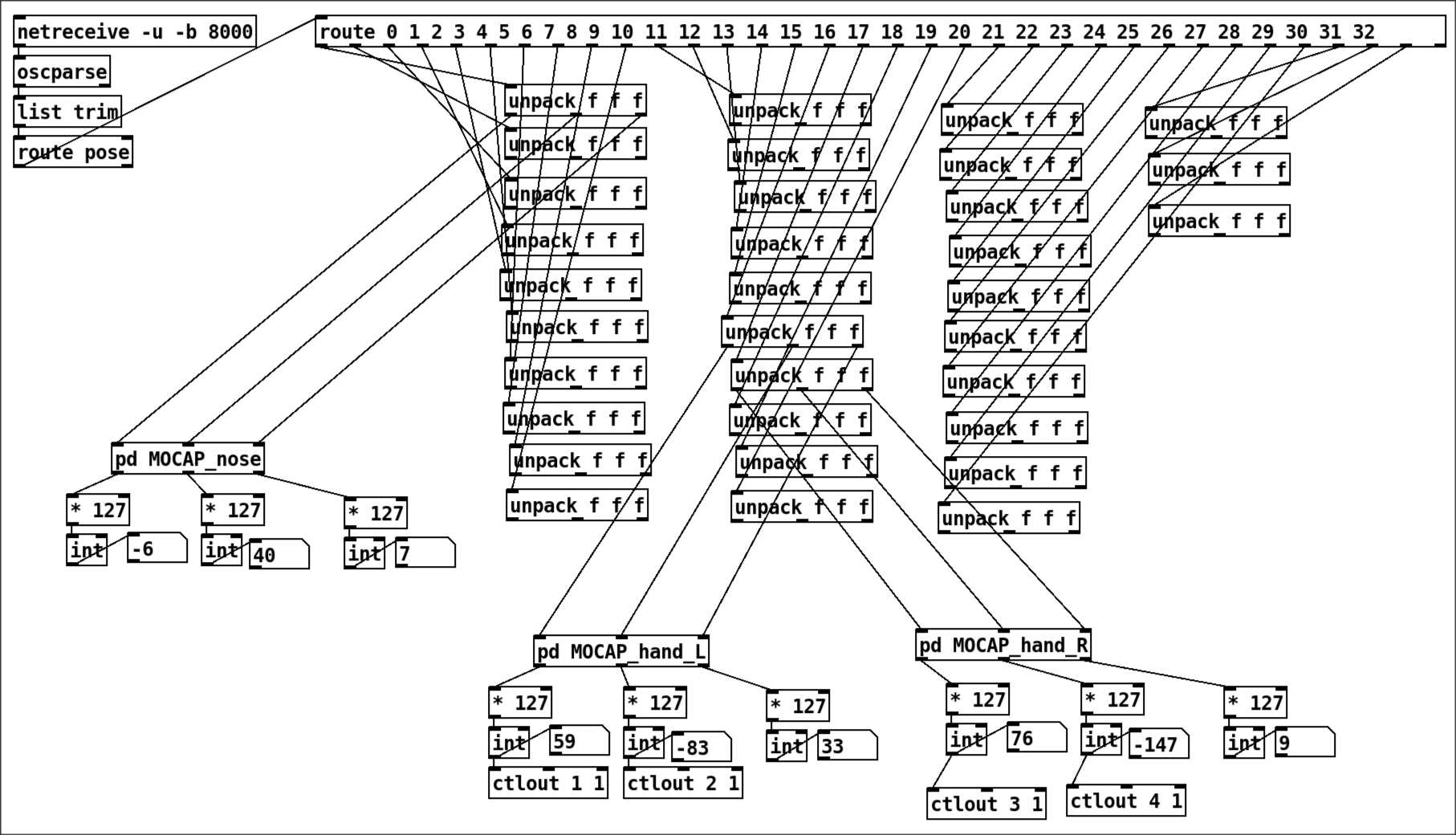
subpatches for each element, [pd MOCAP_nose] for example:
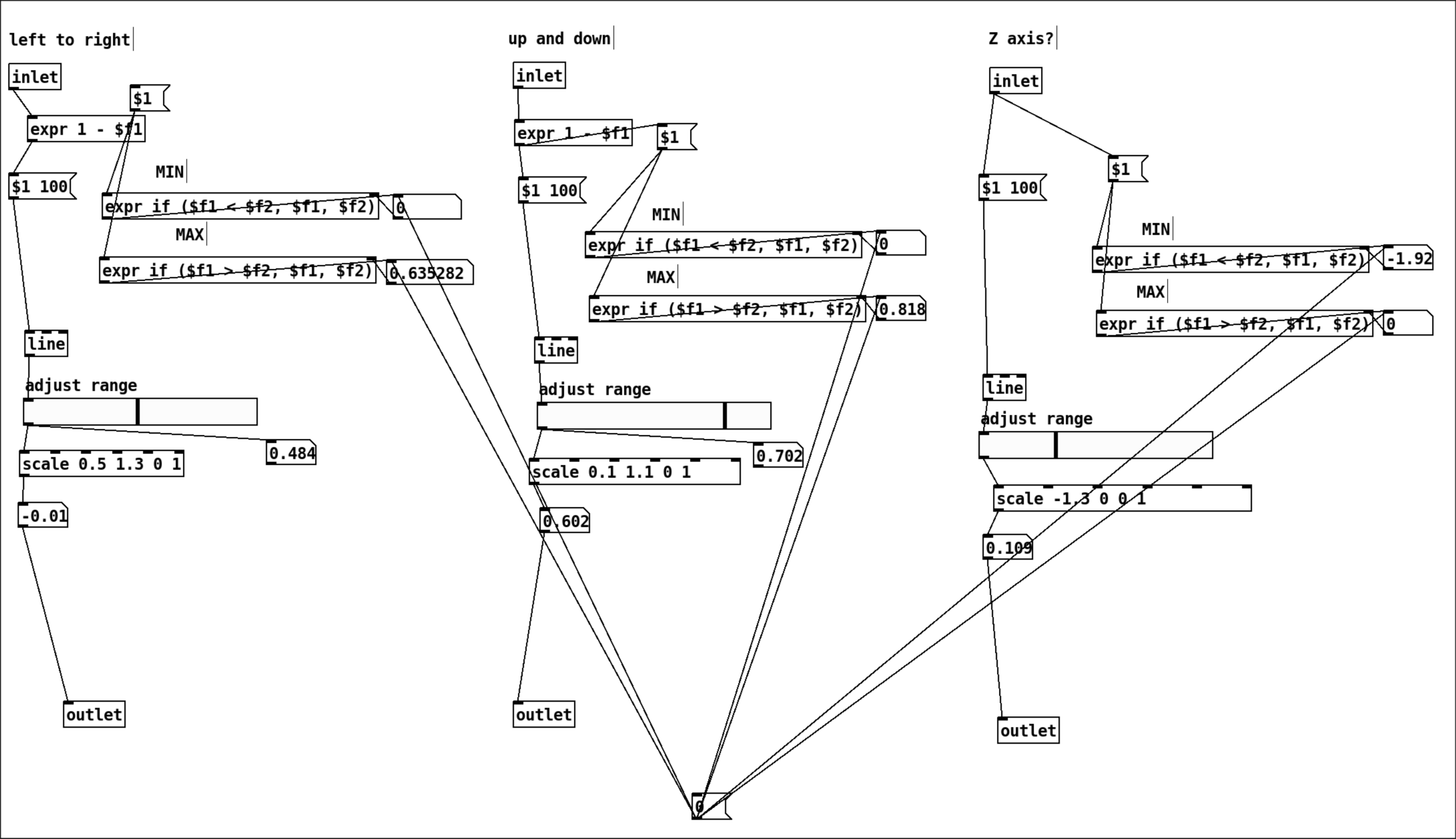
There’s a lot of fine tuning here. [scale] is your friend. For MIDI, we need the output to be 0 - 127. So first you need to find your raw output numbers, use scale to have it between 0 - 127.
The message [$1 100( connected to line is basically to smooth the signal so it’s not super truncated. $1 is the raw signal, 100 is the milliseconds to which line will take to go from one input to the other.
There are 33 elements that are being captured, as we can see here:
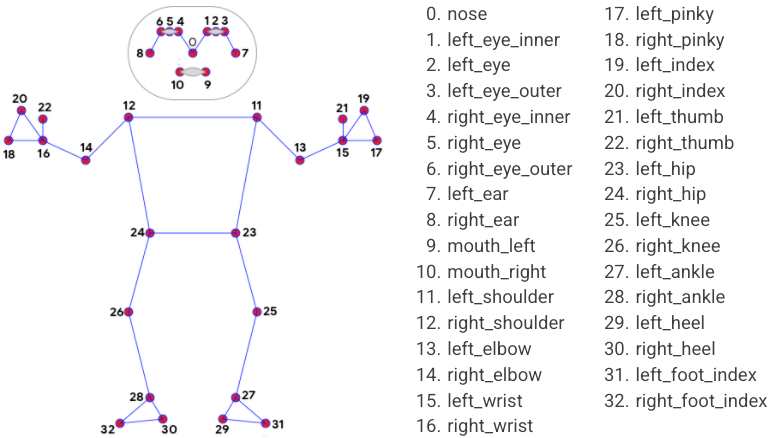
Image from here: https://chuoling.github.io/mediapipe/solutions/pose.html
Ardour
Midi Map
Create new midi map for the pure data midi output.
The midi map goes in /usr/share/ardour8/midi_maps
MOCAP.map
<?xml version="1.0" encoding="UTF-8"?>
<ArdourMIDIBindings version="1.0.0" name="MOCAP">
  <Binding channel="1" ctl="1" uri="/route/gain 1"/>
  <Binding channel="1" ctl="2" uri="/route/gain 2"/>
  <Binding channel="1" ctl="3" uri="/route/gain 3"/>
  <Binding channel="1" ctl="4" uri="/route/gain 4"/>
  <Binding channel="1" ctl="5" uri="/bus/gain master"/>
  <Binding channel="2" ctl="1" uri="/route/pandirection 6"/>
</ArdourMIDIBindings>
/route/gain N controls the fader for track N
/bus/gain master controls the fader for the Master track
/route/pandirection N controls the pan direction for track N
For some reason, I can only have 5 Controllers per Channel. That is why the pandirection gets a new Channel.
https://manual.ardour.org/using-control-surfaces/generic-midi/midi-binding-maps/
To use it in Ardour
- Edit -> Preferences -> Control Surfaces
- Select
Generic MIDIand clickShow Protocol Settings- Incoming MIDI on: MIDI Through Port-0 (capture)
- MIDI Bindings: MOCAP
- Exit both windows and it should be good to go.
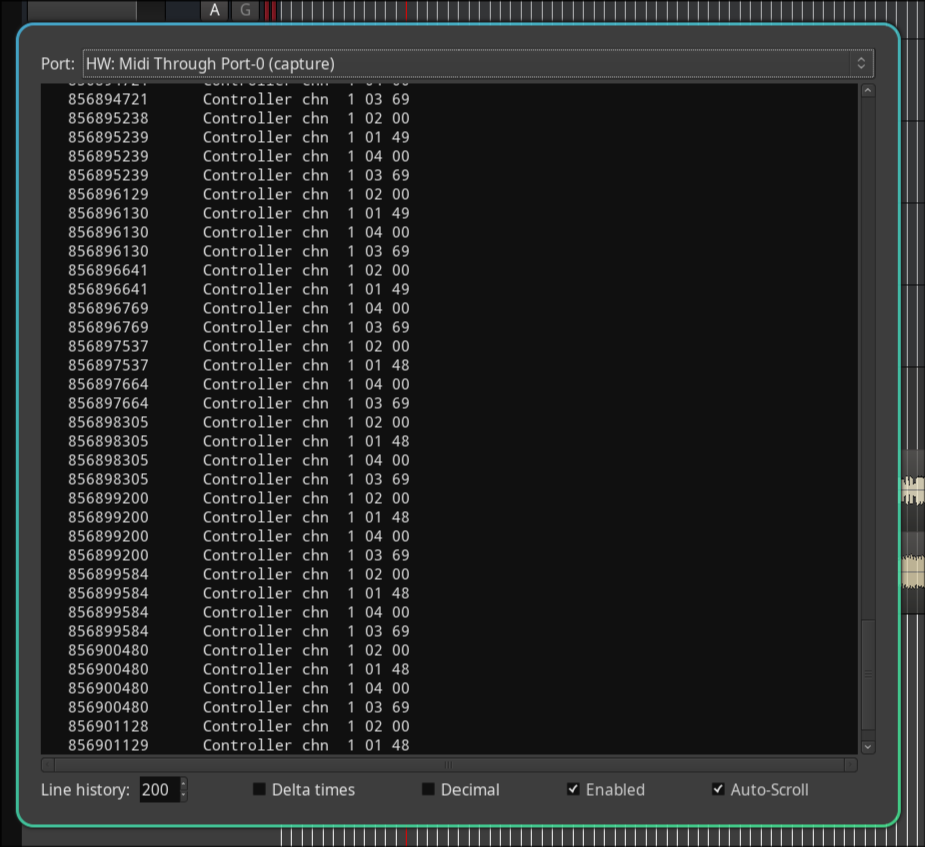
Check if you’re getting signal
- Go to Window -> MIDI Tracer
- Port: MIDI Through Port-0
You should see cascading numbers and see that you have the channel and controls giving the values you’re expecting:
How it works
In pure data, the object [ctlout] is the one sending the MIDI signals. You need to specify the channel and controller. I have it as channel 1, so it looks like in the picture above: [ctlout 1 1], [ctlout 2 1], [ctlout 3 1], etc.
It is a bit confusing because in Pure Data the order is Channel then Controller. But in Ardour it is Controller then Channel. I think…
The number of channels you have in your pure data patch should minimally match the midi map for Ardour. The configuration for the midi map should be straightforward. Check other midi maps for inspiration.